Earlier this week, IronCAD released a new seamlessly integrated Multi-Physics module. Multi-Physics for IronCAD (MPIC) is the latest generation of integrated CAD/FEA for general entry to advanced design simulations. The software focuses on ease of use and provides fully coupled Multiphysics with stress, thermal, and electrostatic analysis.
Traditional FEA solutions are not particularly well suited for quick, in-process design analysis. With MPIC, users at any skill level will be able to use full FEA capabilities. Seamlessly integrated, users can simply add material, forces or constraints, and the AutoSolve meshes and returns analysis results. Any modifications to the IRONCAD model enables an analysis re-solve in seconds.
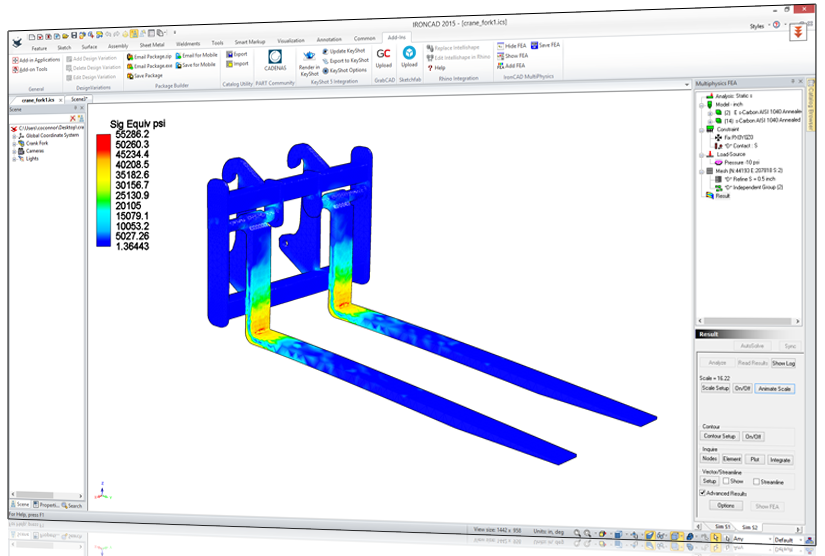
With MPIC, users at any skill level will be able to use full FEA capabilities. Seamlessly integrated, users can simply add material, forces or constraints and the AutoSolve meshes and returns analysis results.
As part of the IronCAD Gold Partner Program, a node-limited version of MPIC is included with full product capabilities with the standard IRONCAD solution. Beyond the included version, customers can purchase a full accuracy basic version, advance version, and add-on functionality. MPIC is available for purchase through IronCAD distributors along with product licensing and technical support.
Cary O’Connor, vice president of marketing at IronCAD says, “Our goal was to help our customers solve complex multi-physics tasks quickly and accurately. MPIC is an advanced multi thread FEA application with fast solver technology that can process large models with millions of equations in minutes. Even though the included version is node-limited, MPIC’s technology gives our customers extended capabilities to quickly and accurately test their product designs.We believe that all IronCAD customers can benefit from increased design productivity.”
Chuck Paulsen, business director of AMPS Technologies states, “We designed MPIC to deliver a video game-like experience to analysis but behind the scenes, the advanced and robust AMPS technology provides a true what-if analysis tool for designers who need to pre-check, concept-proof, and experiment with different design scenarios. Collaboration with IronCAD offers a win-win solution for customers with innovative and easy-of-use solid modeling combined with completely integrated multi-physics analysis.”
Multi-Physics for IronCAD and technical information is available for immediate download here.
Comments
Post a Comment